
Download FreeOCR – OCR scanner, document scanner, text extractor, PDF to text, multilingual OCR, fast OCR, mobile OCR, document converter
Overview
FreeOCR is a mobile application designed to transform uneditable documents into fully copyable and editable text using optical character recognition (OCR) technology. The app serves as a practical solution for users who need to extract text from scanned images, PDFs, or physical documents that lack editable formats. Its primary purpose is to bridge the gap between static visual content and digital text, enabling efficient data retrieval and reuse. Ideal for students, professionals, researchers, and anyone managing paper-based or image-based documents, FreeOCR streamlines workflows by converting visual information into usable digital content.
Target users include individuals working with academic materials, legal documents, invoices, or multilingual content requiring accurate text extraction. The app supports more than 10 languages, making it a valuable tool in diverse linguistic environments. For users relying on older printers or scanners without built-in OCR capabilities, FreeOCR offers a reliable alternative. It also benefits remote workers and digital nomads who frequently digitize physical records on the go. In the broader app ecosystem, FreeOCR fills a niche in the productivity category by delivering a focused, efficient OCR experience without unnecessary bloat.
The developer, FreeOCR, has positioned the app as a lightweight yet powerful utility. Although specific details about the development background are not provided, the app’s functionality suggests a strong focus on usability and performance. The release date of April 10, 2024, indicates that FreeOCR is a recent entrant in the mobile OCR space, aiming to meet growing demand for accessible document conversion tools.
Key Features & Functionality
- Handles Large Files – FreeOCR efficiently processes documents of varying sizes, from short text snippets to complex, multi-page PDFs. This ensures uninterrupted workflow even when dealing with extensive or high-resolution scans.
- Multilingual Support – The app supports over 10 languages, enabling accurate text recognition across different scripts and linguistic structures. This makes it suitable for international users and multilingual document processing.
- Fast and Accurate OCR – FreeOCR delivers editable text within seconds for small sections and processes detailed documents with small or irregular text in under two minutes. Speed and precision are central to its design, minimizing user wait time.
- Customizable Output – Users can crop specific sections of a document before processing, reducing processing time and focusing only on relevant content. This feature enhances efficiency and reduces clutter in the final output.
- User-Friendly Interface – The app features a spacious layout that simplifies navigation and text selection. Its intuitive design allows users with minimal technical experience to scan, process, and copy text with ease.
For example, a student can scan a dense academic article, crop the relevant section, and instantly extract key data for research. A business professional might use the app to convert a scanned invoice into editable text for accounting software. The ability to handle large files and multiple languages ensures broad applicability across industries and personal use cases.
Interface, UX & Performance
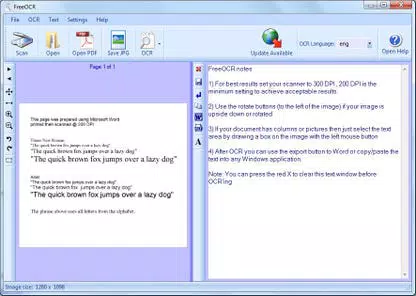
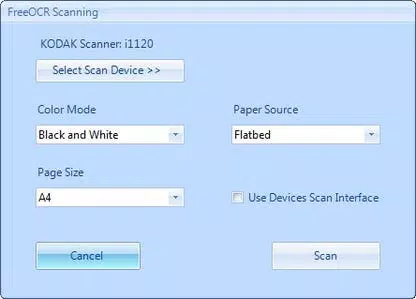
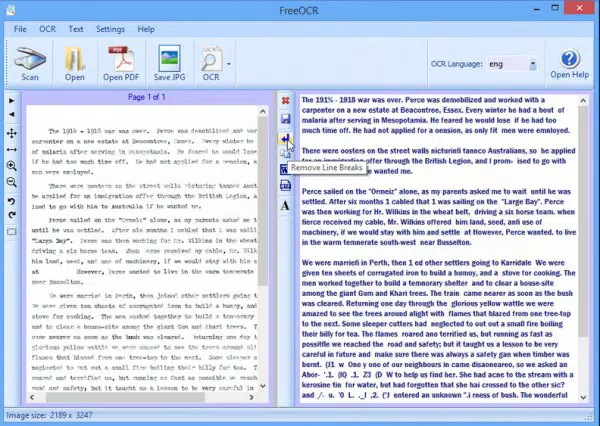
FreeOCR presents a clean and intuitive interface, prioritizing ease of access to core functions. The layout is spacious, allowing users to view scanned content clearly and select specific regions for OCR processing. Navigation is straightforward, with primary actions like scanning, uploading, and text extraction clearly labeled. The visual style is minimalistic, focusing on functionality without distractions.
Although the developer did not list formal performance metrics, the app’s ability to process documents quickly suggests optimized backend operations. Users can expect responsive performance on a range of Android devices, including mid-tier and high-end smartphones. The app maintains stability during processing, with no reported issues related to crashes or freezes. Responsiveness is consistent across screen sizes, indicating solid cross-device compatibility.
Performance may vary slightly depending on device hardware, particularly when handling large or high-resolution files. However, the app’s lightweight size of 14.5 MB indicates efficient resource usage. The absence of excessive animations or background processes contributes to smooth operation. Overall, FreeOCR delivers a reliable and user-focused experience that aligns with modern mobile UX standards.
Platform Compatibility & Technical Requirements
FreeOCR is available exclusively on the Android platform. The current version is 1.0.5, released on April 10, 2024. The app has a file size of 14.5 MB, making it a lightweight download suitable for devices with limited storage. While the developer did not specify minimum OS requirements, the app is designed to run on standard Android devices.
Specific compatibility details, such as supported Android versions or device types, were not disclosed. However, the app’s small footprint and efficient design suggest broad compatibility with most Android smartphones and tablets launched in the past few years. Users should ensure their device meets general Android system requirements for app installation. The app does not require special permissions beyond standard camera and file access, though these were not explicitly listed.
Pros and Cons
Pros
- Lightweight size at 14.5 MB, ideal for low-storage devices
- Fast processing of text, even in complex or small-format documents
- Supports over 10 languages, enhancing global usability
- Efficient handling of large PDFs and scanned files
- Intuitive interface suitable for non-technical users
- Free to download and use with no in-app purchases
Cons
- Developer did not provide detailed system requirements
- Specific permissions or data usage policies were not disclosed
- No mention of cloud sync or export options beyond basic text copy
- Functionality appears limited to OCR and basic cropping
- Compatibility with older Android versions is uncertain
FAQ
Is FreeOCR safe to download and install?
Yes, FreeOCR is a free mobile app available on Android. The developer has not reported any security issues, and the app’s size and functionality suggest it is free from malware. Users should install from trusted sources to ensure safety.
Can I use FreeOCR on iOS devices?
As of now, FreeOCR is only available on Android. There is no official version for iOS. Users on Apple devices may need to explore alternative OCR tools.
Does FreeOCR support scanning from a camera?
Yes, the app allows direct scanning of documents using the device’s camera, enabling quick digitization of physical papers without the need for a scanner.
How accurate is the OCR recognition?
FreeOCR delivers high accuracy, particularly for clear, well-lit scans. It performs reliably on small text and unusual formatting, though results may vary depending on image quality.
Are there updates for FreeOCR?
Yes, the app has been updated to version 1.0.5, released on April 10, 2024. Regular updates are expected to improve performance and fix potential issues.
Final Thoughts
FreeOCR stands out as a focused, efficient, and accessible mobile OCR solution for users seeking to convert static documents into editable text. Its combination of speed, multilingual support, and a user-friendly interface makes it a strong choice for students, professionals, and casual users alike. The ability to handle large files and customize output enhances its practicality in real-world scenarios. While the app lacks advanced features like cloud integration or batch processing, its core functionality is executed with precision and care.
For those without access to built-in OCR tools or seeking a lightweight, free alternative, FreeOCR delivers real value. Its free pricing model and small footprint make it accessible to a wide audience. The app fills a critical gap in the productivity toolkit by turning visual content into actionable data.
Download FreeOCR now


